
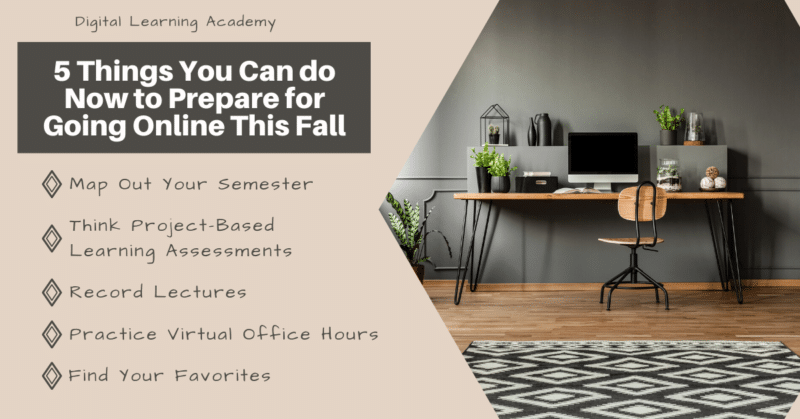
5 Things You Can Do Now to Prepare for Going Online This Fall Ready or not, the Fall 2020 semester is here! You may or may not know what that looks like yet for your courses. Will you be back to face to face or be online in some capacity? Either way, here are five things you should be doing now to be ready for whatever curveball the Fall 2020 semester throws at you! Preparing for the start of a new semester is always filled with so many emotions — excitement, motivation to try new ideas, nervousness, and probably a little stress in there too. However, no matter what field of education you are in, this start of the semester is probably bringing a whole new set of emotions — uncertainty, concern, stress. To help minimize those heavy emotions and bring back some of the excitement and motivation, we have created this simple list of five things you can do over the next few weeks to help prepare you for the start of the semester. Don’t miss out on the FREE Course Map Planning Sheet Download below! Disclosure: This post contains affiliate links and I could earn a small commission at no additional cost to you should you make a purchase using them. All recommendations are based on my personal experience. Table of Contents Mapping Out Your Semester Plan your work for today and every day, then work your plan Margaret Thatcher We all know that lesson plans, curriculums, and program standards are what make the education-world go round, but have you mapped out your semester yet? Mapping or planning out your semester is one great way to ensure a couple of important things happen in your course: Students learn and achieve what you need them to throughout the semester. You have an inkling of an idea of what topic or concept you are supposed to be lecturing on today. Your instruction is focused and doesn’t veer off on too many tangents. You are able to easily track you and your students’ progress throughout the semester. Planning out your course is not specific to one style or format, of course. It can be done for all courses across all formats or learning environments (online, F2F, hybrid). Need a FREE Course Map to Help You Plan Your Online Course? Be sure to snag our Course Planning Map above to help you start planning out your semester. We encourage you to use this map to plan out all of your courses. If you are mapping out a face to face course, we also want to challenge you to think about how the different components you are planning would transfer to online learning. We hope all your face to face courses are able to stay in the classroom, but it won’t hurt to keep the idea of going online in the back of your mind as you are planning. Our Course Planning Map will prompt you to think about and plan for all the important aspects of instruction, such as; learning objectives, learning materials, and assessments. Be sure to get the FREE file above! Think Project-Based Learning Assessments As learning is shifting to the online environment, your focus does not have to turn away from your students and to the computer screen. Instead, be creative and find new ways for your students to take charge of their learning even though you may be at a distance! Project-based learning can be an extremely powerful and engaging way to learn even in the online environment. “Project Based Learning is a teaching method in which students gain knowledge and skills by working for an extended period of time to investigate and respond to an authentic, engaging, and complex question, problem, or challenge.” PBLworks.org Project-based learning is meant to be student-centered and student-driven, so think outside of the box and find new opportunities for your students to really control and engage in their own learning. Give them all the tools and supports they need and then let them learn! You probably will be surprised at what they can do. Please do keep in mind that this may not always be appropriate for all ages of students. However, we do believe that given the correct supports and tools, even our youngest students can do amazing things online. ePortfolios are an amazing online tool for project-based learning! We would recommend checking out Digication as an excellent platform designed to be used in any education setting. ePortfolios can be an outstanding digital platform for students to demonstrate their learning creatively. Here are a few ideas of project-based learning assessments that could be showcased in an ePortfolio: Create a website for a service or product (business, accounting, media, trades) Record a podcast (communications, media, leadership) Document a creation process (art, culinary, trades) Create an ebook (writing, language studies) Design and develop a training program (kinesiology, nursing, health care) Develop a personal ePortfolio of a skill (resume building, leadership, graduating students) SO MUCH MORE! Please comment below or share any additional ideas you might have on our Facebook page! Introduction to Online Teaching Masterclass Do not miss out on this one time offer to pre-enroll in our Introduction to Online Teaching Master Course! This course is designed to provide online instructions with a strong foundation in online teaching best practices. Offer ends 3/22/2021 Claim Your Seat Now! S A L E ! Record Lectures After you’ve planned out your course, you can now start recording some of your lectures! Having your lectures pre-recorded will save you so much time as you begin delivering your course. You might be asking, “Why would I pre-record my lectures if I teach face to face?” There are so many ways you can use recorded lectures in person. One of the biggest is that it frees you up to do other things! If you teach K-12, imagine creating stations that your students can rotate through. At one station, students can watch your lecture(s); at another, they

Establishing Online Expectations
ESTABLISHING ONLINE EXPECTATIONS 4 Things Your Students Need to Know as You Move Your Course Online On the first day of class, you make sure to provide your students with all the information they need to be successful in your in-person course. Now as you prepare to teach your in-person class online because of the COVID-19 pandemic, it is crucial that you give your students updated information about how to be successful in your ONLINE course. In this article, we will cover four important aspects of establishing your NEW online learning expectations. Once your students know what is expected of them, and they know exactly what they can expect from you, successful online learning can begin! Disclosure: This post contains affiliate links and I could earn a small commission at no additional cost to you should you make a purchase using them. All recommendations are based on my personal experience. Table of Contents How to Contact You This information may seem obvious to you, but it is essential information to reiterate often to your students. Just think about it, students always knew they would be seeing you every Monday and Wednesday at 8:00 am so if they needed to contact you, most likely they did it during class. Plus, do you think they have the syllabus with your contact information that you passed out on the first day of class? Probably not. Contact information that you should consider sharing again with your students includes: Institutional email address Skype/Microsoft Teams/Google Hangout Username (the name students can use to search for you on whatever virtual conferencing tool you are using) Phone number (if you aren’t in your physical office then don’t include that number! Only share your personal number if you feel comfortable with students calling or texting you) Fax number … Ha – just kidding, please don’t! In addition to informing your students of how they can reach you, it is also essential to let them know what your response time will be. Time is valuable to you and your students, so let them know when they can expect to hear back from you. Here are a few examples, choose one or two and tweak them to fit your response time, and then share it with your students. Response 1 – Email If contacting me by email, I will respond within 24 hours during the week and 48 hours during the weekend. Response 2 – Phone When calling, please leave a message with your first and last name and what course you are in. I most likely will not answer any numbers I recognize so it is important that you leave me a detailed message. I will return your call within 24 hours during the week and 48 hours during the weekend. Don’t forget to leave me a phone number to call you back at. Response 3 – Virtual Office Hours I will be holding virtual office hours every Tuesday and Thursday from 1:00 PM – 3:00 PM (MST). Use this link <insert video conferencing tool of choice> to join my meeting room. Response 4 – Discussions If you have a question you feel the whole class would benefit from, please ask it in the “Ask the Instructor” discussion board. I will respond to all questions by 5:00 PM each day. What Will Online Learning Look Like in Your Course How many times have you heard the phrase, “In these uncertain times…” over the past few months? Probably quite a few times. While we are in new and uncharted waters, you certainly do not want your students to feel uncertain about what is going on in your course. To clear up any uncertainty, let them know precisely what your course is going to look like now that it is online. Be sure even to reiterate the things about your course that will stay the same. Here are a few uncertainties your students may be having: How will quizzes and exams be administered/completed? How will assignments and projects be submitted? Has the course schedule changed? Will the grading criteria for assignments change, and if so, how? How often should I be checking my email or course site? What will lectures or class activities look like now? Providing your students with the most explicit details about the questions above and any additional questions will help everyone, including you, as the instructor, be more successful in the online learning environment. QUICK TIP: Create a quick video answering the questions above – timesaver for you, and more engaging for your students! We recommend checking out Screencast-O-Matic or Camtasia to create videos and record your screen. You might even consider editing your original course syllabus to reflect all the changes and resending it to your students. As mentioned above, it is also vital that you let your students know when and for how long you will be online in your course each week. Giving your students guidelines for how long or how often they should be checking in online in your course is also a vital point to make when communicating expectations. Introduction to Online Teaching Master Course Do not miss out on this one time offer to pre-enroll in our Introduction to Online Teaching Master Course! This course is designed to provide online instructions with a strong foundation in online teaching best practices. Offer ends 11/16/2020 Claim Your Seat Now! S A L E ! How to Access Course Content Virtual lectures, narrated PowerPoints, PDF readings, supplemental videos, online quizzes, digital dropboxes….the list of all the new technology you may now be using goes on and on. With so much change so quickly, you must help your students understand how to access your course materials. This may be new territory for you as well, but please know there are usually so many helpful resources surrounding educational technologies, so do not be afraid to look and find help! Like our Facebook page where we will be posting helpful tips and tricks and online teaching and learning resources. Here

How to Move Your Course Online During the Coronavirus
6 Tips to Help You Transition Your In-Person Class Online During the Coronavirus Outbreak Institutions across the nation are actively preparing to move their on-campus classes into an online format as a measure to prevent the spread of the Coronavirus. For many, this migration from in-person teaching to online teaching can be a daunting task, but it does not have to be! With these 6 helpful tips, you can easily move your in-person class online successfully. The tips below include online teaching strategies, tools that can aid in teaching online, and important things to consider as you make this transition. It is important that before you begin to transition your in-person class to an online environment, that you know the resources that are available to you through your institution. There is no sense in reinventing the wheel here! Most institutions have a team of Instructional Designers, Educational Technologists, and Distance Education Staff that are busy at work preparing to help you. If you are not currently familiar with what technologies your institution has, now is the time to know what is available to you and your students. Here are a few questions you should know the answers to as you begin transiting your course online: What Learning Management System (LMS) do we use at this institution? Where can I find LMS resources so that I can learn how to use the platform? What third-party technology tools are available to me to use? What virtual communication or video conferencing tools are available to me and my students? Are there any trainings available to aid me in learning how to best deliver my course online? What are institutional policies regarding the use of third-party technology tools? After you have read the tips and recommendations below it will be time to get started transitioning your in-person course online. This starts by making a plan, then communicating your plan to your students, putting your plan into action, and then constantly communicating with your students so you know what is working and what needs adjusting. So here we go! Disclosure: This post contains affiliate links and I could earn a small commission at no additional cost to you should you make a purchase using them. All recommendations are based on my personal experience. Table of Contents #1 Embrace Virtual Communication & Office Hours Communication is going to be the key to success over these next few weeks! Not only are you having to learn a new way of teaching but your students are also having to learn a new way of learning. As we mentioned above, make a plan and then let your students know what that plan is. Something we all take for granted with in-person classes is how easy it is to communicate the little details with our students without really even thinking about it. As you transition to communicating strictly online, you will have to be much more diligent and thoughtful with how and what you communicate with your students. They will not be able to read your mind so you must tell them everything they will need to know and do to continue to be successful in your, now, online course. Lucky for you and your students, communicating online has never been easier! Here are a few tools that make communicating online a breeze: Zoom: we will mention this tool often in this article. Zoom is an amazing video conferencing tool that will allow you video chat, share screens, record sessions, and save and share recordings. Google Hangouts: also a great video and chat communication tool. If your institution uses Google Suites, your students may already be familiar with the tool and its functionality. Microsoft Teams: is an easy to use communication platform that allows for ongoing chat sessions, video and audio calls, file share, and even the use of GIFs. If your institution uses Outlook or Office365 you may have access to this tool. Using one of the tools above, try hosting an open office hour session with your students. This would allow you and them to become comfortable using the new tool to communicate with each other and give them an opportunity to ask you questions. Showing your students that you are still very available to them will help ease their worries and yours too! #2 Change up Your Lecture Style Say goodbye to the lecture hall, and say hello to giving lectures in your sweatpants! You’ll learn that one of the great things about teaching online is the ability to do it from wherever and whenever you want. This means you can give your lecture from the comfort of your couch late at night or first thing in the morning while sitting in our favorite coffee shop. One major logistic to keep in mind when making this transition from in-person to online is that your course may need to become more asynchronous. Meaning your students may not be online the exact same time you are but they still need to be able to learn. Before, you gave your lecture every Monday and Wednesday at the same time at the same place and your students were expected to be there. This is an example of synchronous learning. However, your students may now need more flexibility when it comes to learning online. We would still encourage you to give “live” lectures using the tools listed below, but we would also highly recommend that you record your lectures so that students can still access the information even if they were not able to join the live session. Synchronous Learning A learning event in which a group of students are engaging in learning at the same time. Asynchronous Learning The act of facilitating learning outside of the constraints of time and place among a group of people. The tools listed below are capable of live video and audio conferencing, chat, and screen share. They also have the ability to be recorded so that students can watch your “live” lecture at their
All About 20/20 Instructional Insights
Hello & Welcome! Share on facebook Share on twitter Share on linkedin Share on pinterest Share on email Digital Learning Academy (DLA) is an up-and-coming resource site for online instructors. The purpose of the 20/20 Instructional Insights is to provide you, the online instructor, with concise and applicable focus points. These focus points are designed to help you examine the instructional strategies you use and to provide you with easy to apply action steps to enhance your online instruction in the year 2020. 20/20 Instructional Insights are designed to help you better: Focus on the best components of your online instruction Give you clarity on tough concepts when it comes to teaching online Enhance your vision of the future of your online courses While these focus points will be geared towards instructors teaching online in the higher education setting, our hope is that the information will also be valuable to anyone involved in online learning. Subscribe to receive our 20/20 Insights below. Each week DLA will publish a new 20/20 Instructional Insight focused on a topic relevant to that specific time in the semester. You can find all Insights here and on our Facebook page. Focus Points Why Should You Follow DLA’s 20/20 Instructional Insights? We are excited to start sharing our enthusiasm for online learning with you. We hope you will consider DLA to be one of your go-to resources as you navigate online instruction. That is why we have worked hard to ensure all our 20/20 Insights are founded in the latest educational research and important trends in online teaching and learning. Our Insights will be crafted to be clear and concise for quick reading. We know how important your time is and we appreciate you spending it with us! Information is great. Information and action is even better! That is why in each Insight we will provide you with relevant action steps that you can easily apply to your online instruction that day. Finally, DLA is busy at work creating resources just for you. Keep an eye out for downloadable resources such as editable templates, reference guides, and instructional videos. Everyone loves a freebie! We will also be offering professional development courses in Summer 2020 that will provide online instructors with everything they need to successfully teach in the online learning environment. Check out DLA’s Courses Take Action Now that you know a little about us, we would love to hear from you! With Spring Break just around the corner, what better time for reflection and refocus. Our action challenge for you this week is to take a moment to look at your online course(s). What is going well? What is something that you would like to improve in your online instruction? What has been your biggest challenge this semester? What has proven to be an effective instructional strategy for you? We would love to hear your thoughts as you reflect on your online courses. Your thoughts and feedback can help us provide more information and resources that are relevant to you. Please feel free to respond by posting in the comments below, on our Facebook page, or by shooting us a quick message – we would love to hear from you. Next Week Stay tuned! Next week we will be covering how to use formative assessments to better get a pulse on what your learners are thinking and feeling about their online learning experience. Don’t miss a thing, please subscribe below to receive DLA’s latest 20/20 Instructional Insights. Please also Like and Share our DLA Facebook page. Thanks and we look forward to “seeing” you next week! Share on facebook Share on twitter Share on linkedin Share on pinterest Share on email